


The Myth of “Ultra Settings”: Why Maxing Out Graphics Often Makes Games Worse
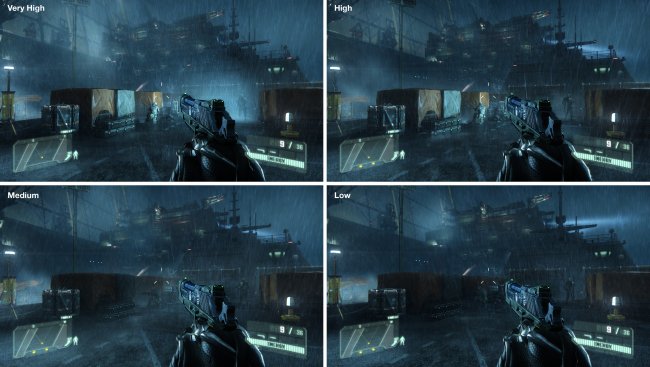
For years, PC gamers have treated the Ultra preset as the ultimate goal. If your system could run a game on Ultra, it was seen as proof that your hardware had arrived. In 2025, that mindset is increasingly outdated.
Ultra settings are no longer a carefully balanced target. In many modern games, they exist as a technical showcase rather than a practical way to play. The result is that maxing everything out can often reduce image quality, introduce stutter, and deliver worse performance with little or no visual gain.
How Ultra Became a Problem
In earlier PC games, Ultra settings were usually an extension of High. They pushed texture resolution, shadow quality, and draw distance a bit further, but they were still designed to run on consumer hardware.
Modern engines have changed that. Many games now use Ultra as a stress test rather than an experience target. Developers include extreme settings to demonstrate engine features, future proof assets, or satisfy enthusiasts who want to push hardware to its limits.
This means Ultra often enables effects that were never tuned for smooth gameplay. They may increase GPU load dramatically while adding only subtle visual improvements that are difficult to notice during actual play.
When Ultra Hurts Image Quality
One of the biggest misconceptions is that Ultra always looks better. In practice, it can do the opposite.
Ultra shadow settings often increase resolution and cascade counts beyond what the scene requires. This can introduce shimmering, unstable edges, and inconsistent shadow detail as the camera moves. High settings are frequently more stable because they use fewer transitions and better filtering.
Ultra ambient occlusion and global illumination settings can also darken scenes excessively. This crushes detail in shadows and reduces visual clarity. Many players end up compensating with brightness or gamma adjustments, which defeats the purpose of the higher setting.
Texture settings are another common trap. Ultra textures can exceed VRAM budgets, especially at high resolutions. When that happens, the engine starts streaming assets aggressively, leading to hitching and sudden drops in frame time. High textures often look identical in motion but avoid these issues entirely.
Performance Cost vs Visual Gain
Ultra settings rarely scale evenly. One option may cost a small amount of performance, while another can cut frame rates in half. The problem is that these costs are not always obvious from the menu.
Ray traced effects are a clear example. Ultra ray tracing modes often increase bounce counts, sample rates, or update frequency. The visual difference compared to High or Medium ray tracing can be subtle, but the performance impact can be massive.
The same applies to volumetric effects like fog and clouds. Ultra settings may increase resolution and simulation quality well beyond what the screen can display clearly. The result is higher GPU load without meaningful visual improvement.
CPU and Memory Side Effects
Ultra settings are not just about the GPU. They can increase CPU load as well.
Higher draw distances and object detail increase the number of objects the CPU must manage each frame. More complex physics simulations and AI detail can also be tied to graphics presets in some engines.
Memory pressure increases too. Ultra settings often assume large VRAM pools and fast storage. If either becomes a bottleneck, performance consistency suffers even if average frame rates look acceptable.
This is why some players experience worse stutter on Ultra than on High, even when their GPU usage appears lower.
Why Benchmarks Make Ultra Look Tempting
Benchmarks often reinforce the Ultra myth. Many reviews test games at Ultra to create clear performance separation between GPUs. While this makes sense for comparisons, it does not reflect how games feel in real play.
Ultra settings exaggerate differences and highlight worst case scenarios. In actual gameplay, most players would benefit more from balanced settings that deliver stable frame pacing and consistent responsiveness.
The Case for High and Custom Presets
High settings are usually the result of deliberate tuning. They aim to preserve visual quality while avoiding extreme costs. In many modern games, High represents the best balance between clarity, stability, and performance.
Custom settings go even further. By selectively lowering the most expensive options, players can often gain significant performance with no noticeable loss in image quality. This approach also reduces VRAM pressure and improves frame time consistency.
In practice, a well tuned High or Custom preset often looks cleaner and feels smoother than Ultra.
Ultra as a Marketing Tool
Ultra settings also serve a marketing purpose. They allow developers to showcase technical ambition and give hardware vendors something dramatic to demonstrate. This is not inherently bad, but it means Ultra is not always designed with the player experience in mind.
As hardware becomes more powerful, Ultra continues to move further out of reach, ensuring there is always a higher ceiling to chase.
Q and A: Common Questions About Ultra Settings
Do Ultra settings future proof my PC?
Not really. Ultra settings are often designed to exceed current hardware and will be redefined again in future games.
Why does Ultra sometimes cause stuttering?
Ultra can trigger shader compilation, VRAM exhaustion, and aggressive asset streaming, all of which cause frame time spikes.
Is Ultra useful for screenshots?
Yes. Ultra settings can be valuable for static scenes, photo modes, and visual analysis where performance does not matter.
Why do developers include Ultra if it is not ideal?
Ultra settings showcase engine capabilities and allow enthusiasts to push hardware, even if the experience is not practical.
Final Thoughts
Ultra settings are no longer the gold standard they once were. In modern PC games, they often prioritise spectacle over stability and offer diminishing returns in visual quality.
The smartest way to play in 2025 is not to max everything out, but to understand which settings matter and which ones simply consume resources. A balanced approach delivers better image quality, smoother performance, and a more enjoyable experience overall.
In the end, the best setting is not Ultra. It is the one that makes the game feel right.
Tarl @ Gamertech